
ACR Poker Adds ScreenShield as WPN Expands Player Security Measures
Winning Poker Network Responds to Remote-Access Security Concerns With ScreenShield, Player Outreach and Industry Sharing
What the added table protection does, how to request it, and how ACR Poker’s work with GTO Wizard supports wider efforts against cheating.
ScreenShield adds another layer of table protection.
Your hole cards belong at your table, on your screen. Winning Poker Network has responded to remote-access security concerns by activating ScreenShield for relevant players, contacting them directly and sharing information with other poker operators on how similar protection can be developed.
For ACR Poker players, the immediate questions are practical: what changes at the table, can you still stream, and how do you request protection? ACR Poker Support can help with account requests, while the official FAQ provides a route to security and game-integrity information. WPN CEO Phil Nagy addressed those questions in the security update; ACR’s security and integrity policies set out the broader rules for fair play.
Your table stays visible to you
With ScreenShield enabled, you continue to see your poker tables and play normally on your own monitor. The feature blocks protected WPN table content from the screen-capture and screen-sharing methods it covers.
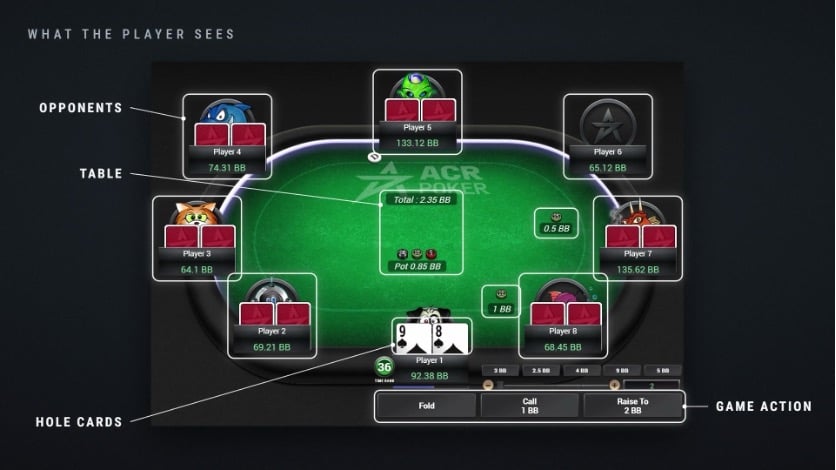
The table information a player can see on their own screen, including hole cards and game actions.
That protection includes information displayed at the table, such as your hole cards. It adds a barrier when external software attempts to capture that content. It does not eliminate every possible security threat, and it is not a substitute for the separate work of investigating suspicious play.
Nagy described its role simply: “It’s another layer of protection, not a magic button.”
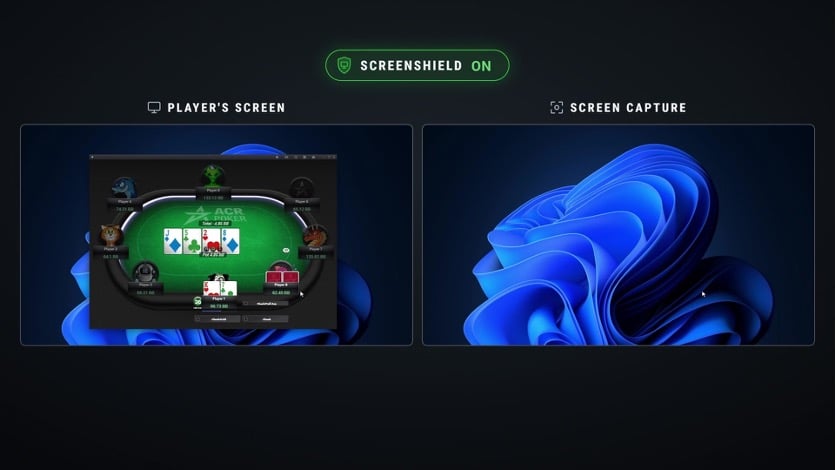
In this demonstration, the poker table remains visible to the player while the captured view shows the desktop without the protected table.
Players were contacted before the public demonstration
On Tuesday, September 29, WPN contacted players identified as meeting its detection criteria for software with remote-access or screen-control capabilities. ScreenShield was activated for those players as an additional precaution.
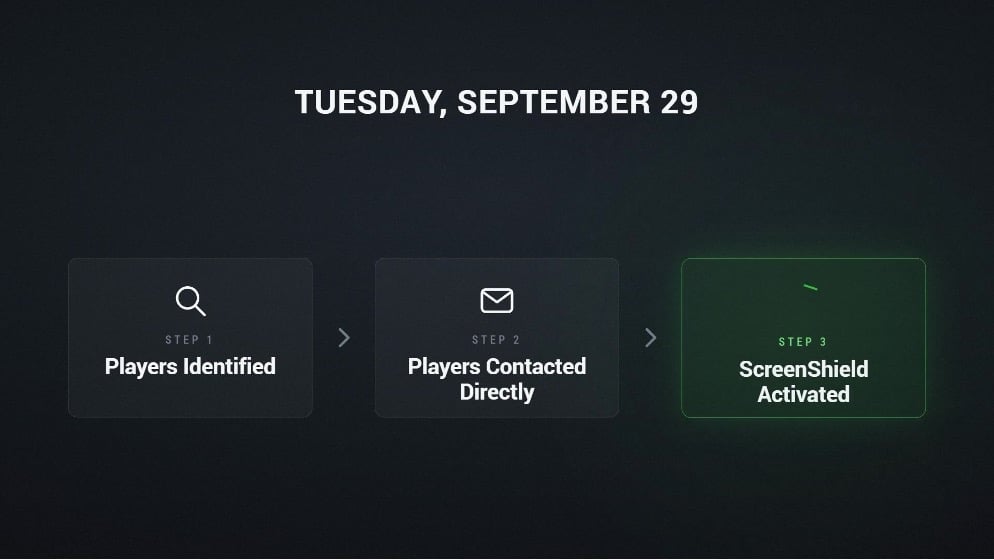
WPN’s September 29 outreach: players identified, contacted directly and given ScreenShield protection.
WPN’s review found no compromise of its systems, poker software or official downloads. Its Game Integrity team is investigating relevant player and account activity. If wrongdoing and harm to WPN players are established, appropriate compensation will be determined from the findings.
On the review of WPN’s own systems, Nagy was direct: “We found no compromise on the WPN side.”
Why it was not switched on for everybody
Remote-access software can have ordinary uses: sharing a presentation at work, collaborating with colleagues, connecting to a work computer or receiving IT support. Finding that capability on a device does not establish that the computer was compromised or that cheating occurred.
“Having that software installed doesn’t, by itself, mean somebody is cheating or that their computer has been hacked,” Nagy explained.
Poker players also stream, record sessions, make content and review completed play with coaches. ScreenShield can affect those capture functions. That practical tradeoff is why protection was not simply enabled for every player. WPN plans regular scans and more proactive application when its detection criteria are met.
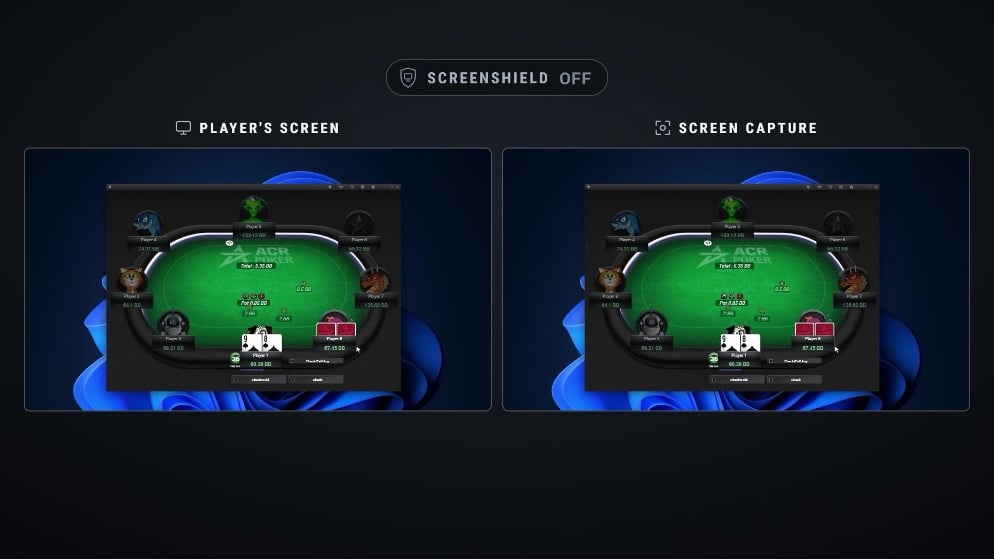
With ScreenShield off, the demonstration shows the poker table in both the player’s view and the captured view.
How to request ScreenShield
Any WPN player can request ScreenShield through Support. Email support@winningpokernetwork.com and allow up to 48 hours for activation. The protection may not be enabled immediately after you send the request.
If you need legitimate streaming, recording or screen-sharing functions, ask Support to review your account settings. A control allowing players to turn ScreenShield on or off directly in the client is being developed; it is a planned update, rather than a button players can use today.
Nagy said: “Any WPN player can also request it through Support, and we’re working toward putting the control directly into the client.”
➡️@ACR_POKER blinda sus mesas tras el escándalo de Paul Gregg 🛡️
▫️@WPN_CEO presenta Screen Shield, un programa para ocultar las cartas a programas como Mesh Agent. ACR también envió historiales a @GTOWizard y estudia posibles reembolsos.
https://t.co/tBxIHWEnoD
— Poker-Red (@poker_red) October 5, 2026
GTO Wizard cooperation adds another check
ACR Poker and GTO Wizard already cooperate to cross-check whether situations played on ACR were solved in GTO Wizard. This supports checks for prohibited solver use during play.
GTO Wizard’s new preflop ICM solver handles tournament situations using customized payout structures. Its public Fair Play Check now includes these solutions and when they were generated. ACR and GTO Wizard are working to implement broader analysis of final tables, with the goal of covering every ACR final table. Full coverage is the aim, rather than a claim that every final table is already being checked.
The shared objective is to reduce cheating through better detection and cooperation. A fast solver and a timestamped record can support an investigation; neither is a promise that cheating can be completely eliminated.
Sharing the approach with other operators
WPN has sent other online poker operators information on how this type of table protection can be implemented, so they can evaluate it for their own players. Sharing guidance does not mean another operator has adopted ScreenShield.
WPN CEO Phil Nagy addresses player security questions in the video update.
Phil Nagy put the reason plainly: “Because player security is bigger than competition.” He also emphasized that the investigation should follow evidence, without speculation about individuals or how software reached a particular computer.
Asked how the software reached players’ computers, Nagy answered: “Not well enough to give you a definitive answer, and I’m not going to make one up.”
For players who want the additional table protection, the next step is straightforward: contact Support to request ScreenShield and discuss any recording or streaming needs.
ACR News

Hole-Card Replays and $25,500 Buy-Ins: How Americas Cardroom’s Second Mortgage Week Is Redefining High-Stakes Online Poker
A Learning Laboratory for the Poker World's Most Expensive DecisionsWhen elite players like Alex Foxen…

Hole-Card Replays and $25,500 Buy-Ins: Americas Cardroom’s Second Mortgage Week Returns for OSS XL 2026
Elite Poker Education Meets High-Stakes Action in Second Mortgage WeekAmericas Cardroom is bringing back one…

Americas Cardroom Grows Its High-Stakes Footprint With Second Mortgage Week’s Return in 2026
Americas Cardroom Expands Its Elite Tournament PresenceAmericas Cardroom has built its reputation on delivering high-stakes…

OSS XL’s $50M+ Series Reaches Its Peak With Second Mortgage Week High-Stakes Action
OSS XL 2026: Where the Action PeaksThe $50 million+ OSS XL series is one of…

Americas Cardroom Brings Back Second Mortgage Week with 10 Nosebleed Stakes Events During OSS XL
Americas Cardroom has officially announced the return of Second Mortgage Week, its premier high-stakes tournament…
Americas Cardroom Offers $66 Path to $500,000 Main Event This Sunday
A $66 Ticket to Half a Million Dollars Americas Cardroom is giving players a remarkable…
Americas Cardroom Launches Second Mortgage Week with 10 Nosebleed Stakes Events During OSS XL
Americas Cardroom has announced Second Mortgage Week as part of the ongoing OSS XL series,…
Americas Cardroom Shatters Records with $25,500 Buy-In Tournament and $1.325 Million Prize Pool
Record-Breaking Buy-In Event Marks New Era for Online PokerAmericas Cardroom has raised the bar for…
AlwaysWithNuts Wins $371,000 as Americas Cardroom Raises the Stakes with Historic Tournament
A Player's Triumph at the Highest StakesIn one of the most talked-about results in recent…